Grok Imagine 1.5 AI Video Generator
Upload one image and make products, characters, and ad concepts move. Use Grok Imagine 1.5 to create cinematic AI short videos fast.





Trusted by creators exploring fast AI video directions
No results yet
Click the Generate button above to start
What is Grok Imagine 1.5?
Grok Imagine 1.5 is an image-to-video AI generator that turns one reference image into a 1-15 second video with 480p / 720p / 1080p resolution, eight aspect ratios, and optional prompt control. It is useful for product motion, portrait clips, character animation, ad previews, and storyboard tests.
Start from a reference image and create steadier short videos
Grok Imagine 1.5 works best when you begin with a reference image. Upload a product shot, portrait, character frame, poster draft, or brand visual, then let the model add motion, camera movement, and environmental change while keeping the subject and style more stable than a fully open text-to-video prompt.
For ad previews, social clips, character motion, product animation, and storyboard drafts, 1.5 helps turn static assets into video directions quickly. You do not need a long prompt at first. Start with a clear image, then describe the motion precisely: a slow camera push, a gentle product rotation, flickering background lights, or a subtle head turn.
When using Grok Imagine 1.5, prepare the reference image first, then choose duration, aspect ratio, and resolution. Start with a 1-3 second clip for low-cost direction testing, then extend to 8 seconds or longer once the motion and camera rhythm feel right.
Grok Imagine 1.5 is strongest with reference-led video
Grok Imagine 1.5 is not only about typing a sentence. It is about making an existing image move naturally. You control the reference image, duration, framing, and resolution while the model extends the static frame into a paced short video.
Reference image anchors the subject
Upload an image first, then let the model extend motion. This fits portraits, product shots, character sheets, mood frames, and ad concepts because identity, composition, and style are already present in the image.
Prompts guide motion and camera
The prompt is optional, but strongly recommended. Describe subject action, camera push, pacing, light changes, environment details, and sound mood so the result follows your creative intention more closely.
Short-form settings are more precise
Continuous duration control is useful for social clips, ad previews, and storyboard tests, while shorter clips can keep experiments cheaper.
Upload behavior stays controlled
Uploads stay capped at 10MB, which fits most product shots, portraits, and character frames. Lighter files are easier to upload and reduce waiting plus retry friction.
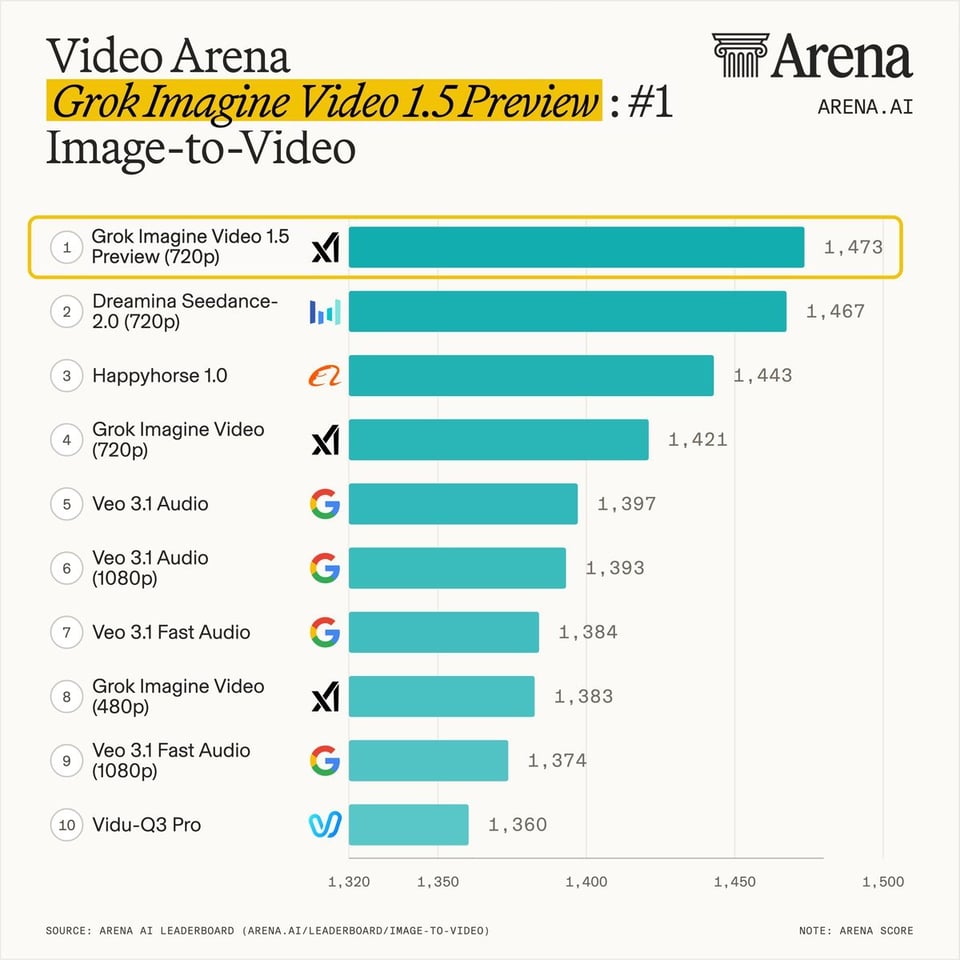
Grok Imagine Video 1.5 Preview ranks #1 on the Image-to-Video Arena
The leaderboard screenshot shows Grok Imagine Video 1.5 Preview (720p) ranked #1 on the Image-to-Video Arena with an Arena score of 1,473. This gives the landing page a clear reason to feature 1.5 as a dedicated entry: it is not just another model name, but a stronger image-to-video option for quality, stability, and usable short clips.
A practical workflow from source image to usable clip
Good image-to-video results depend on the model, but also on source clarity, prompt specificity, and output settings that match the intended use. This workflow gives most users a reliable first pass.
Prepare a clear reference image
Use an image with a clear subject, clean edges, stable lighting, and minimal occlusion. Product shots can keep a useful environment; portraits should avoid cropping too much of the face or hands.
Write motion, not only adjectives
“Slow camera push, hair moving in a light breeze, background lights flickering softly” is usually more useful than only “cinematic, realistic, high quality” because the model needs to know what changes over time.
Explore cheaply first
Start with 480p and a shorter duration when testing direction. Once action, framing, and pacing are acceptable, increase duration or resolution for a more publishable pass.
Review results in history
History labels show which model was used, making it easier to compare legacy Grok, Veo, Nano Banana, and Grok Imagine 1.5 outputs.
Four video directions that fit Grok Imagine 1.5
Grok Imagine 1.5 is useful beyond one polished demo. It can turn different reference images into short, reviewable video directions. These examples cover action, natural-light portrait motion, close-up expression, and storyboard-style animation so users can understand what an uploaded reference can become.
City adventure action
Height, motion, and environmental depth show camera movement and action pacing.
Natural-light portrait
Expression, hair, and subtle body motion work well for character clips and social assets.
Close-up expression detail
Face stability, eyes, and mouth movement help explain why reference images matter.
Storyboard animation
Turn a storyboard-style image into motion for scripts, short dramas, and concept previews.
How to structure a useful prompt
Grok Imagine 1.5 accepts prompts up to 4096 characters, but most jobs do not need long prompts. A better pattern is to separate the prompt into clear parts: what the subject does, how the camera moves, how the environment changes, the sound or mood, and what should remain stable.
Subject action
Make the person turn, product rotate, fabric move, or light sweep across a surface.
Camera language
Describe a push-in, pull-back, subtle orbit, handheld feel, or stable tracking move.
Environment change
Add background lights, haze, rain, street movement, crowd motion, or depth-of-field changes.
Sound mood
When useful, mention low ambience, light wind, city noise, or a quiet cinematic feeling.
Stability request
Ask the model to preserve identity, face, logo, product shape, clothing, and composition.
Model parameters
Kie has upgraded Grok Imagine Video from 1.0 to 1.5. The API and parameters stay the same; the upstream video price increased on August 3, 2026.
Who should use Grok Imagine 1.5?
If your work starts from a specific image rather than a fully open text idea, 1.5 is easier to use well. It is useful for quick direction testing and for producing visual drafts before shooting, 3D production, or editing.
Product motion
Turn ecommerce images, packaging shots, or concept renders into short moving previews for ad and product-page exploration.
Character clips
Generate social clips from character sheets, avatars, or style frames to test expression, action, and pacing.
Ad previews
Compare lighting, motion, and framing directions so creative teams can align before production.
Content storyboards
Create visual drafts for scripts, short dramas, music videos, or campaign teasers.
Brand visuals
Preserve brand colors, product shape, and composition while adding subtle motion for video channels.
Social testing
Use 1-3 second clips to test attention, then expand winning directions into longer versions.
FAQ
Is Grok Imagine 1.5 a separate backend model here?
No. Grok Imagine Video 1.5 uses the same API and parameters. Kie increased upstream video pricing on August 3, 2026, so this site updated the required video credits.
Does Grok Imagine 1.5 support text-to-video?
Yes. This site keeps both Grok Imagine text-to-video and image-to-video generation paths.
Do Fun / Normal / Spicy still matter?
Yes. They remain the mode parameter for the existing Grok Imagine video API and should not be hidden for the 1.5 upgrade.
Did credit pricing change?
Yes. Kie charges 2.4 credits per second at 480p, 4.5 at 720p, and 8 at 1080p. Required credits for both text-to-video and image-to-video were updated accordingly.
Are credits refunded on failure?
Upload and task-creation failures use the existing refund path. Processing failures are handled according to task status.
How will history labels work?
Both new and legacy Grok video tasks are shown under the current product name, Grok Imagine 1.5, so users see the upgraded model consistently.
Need more Grok Imagine 1.5 credits?
Pricing
Choose the plan that works best for you
Starter
Billed $143.3/year
Perfect for getting started with AI generation
- 1,000 credits per month
- Up to 200 images or 50 videos
- Text-to-Image generation
- Text-to-Video generation
- Image-to-Video conversion
- $0.06/image, $0.36~$1.53/video (6-30s)
Pro
Billed $287.3/year
Best value for regular creators
- 2,400 credits per month
- Up to 480 images or 120 videos
- Text-to-Image generation
- Text-to-Video generation
- Image-to-Video conversion
- $0.05/image, $0.3~$1.28/video (6-30s)
Studio
Billed $575.3/year
For power users and professionals
- 6,000 credits per month
- Up to 1,200 images or 300 videos
- Text-to-Image generation
- Text-to-Video generation
- Image-to-Video conversion
- $0.04/image, $0.24~$1.02/video (6-30s)
Ready to create your first Grok Imagine 1.5 video?
Start from a text prompt for quick exploration or upload a reference image to anchor the subject. Use the existing Grok Imagine controls for duration, framing, and resolution.